Free to start · No signup · 211 lessons

Learn Shopify development.
Write real code from lesson 1.

Fix bugs and build features on a real Shopify store, right in your browser. Your code is checked as you go, and you learn to spot when AI-written code is wrong.

Free. No signup. You write your first line of code in under a minute.

sections/product-information.liquidLive
1<h1>{{ product.title }}</h1>
2<p class="price">
3 {{ product.price }}
4</p>

northwind-coffee.com/products/ethiopian-yirgacheffe

Ethiopian Yirgacheffe, a kraft paper bag of Northwind coffee

Single origin

Ethiopian Yirgacheffe

1899

Task

The price shows 1899. Pipe it through the | money filter so it reads as real currency.

Try it: edit the code and watch the store change · Open the full lesson

It's the course Codecademy is missing. I've followed Shopify courses before and never felt I actually learned anything. This is very different.
Early memberEarly access · professional Shopify dev
A roaster at Northwind Coffee Co laughing as she scoops fresh beans into a kraft coffee bag on a scale.

Day 01 · 9:14am

It doesn't start with a tutorial.
It starts with an email.

Northwind Coffee Co, the (fictional) store you work for.

No long intro. Your first task is already waiting: two small bugs on a product page. Fix them.

Every lesson works like this: you get a task, write a few lines of code, the store updates, and your code is checked. Then the next task arrives.

Inbox · Northwind Coffee CoTuesday, 9:14am
From

Sarah Okonkwo

· Lead Developer

to: you

Welcome. First thing, fix the product page price

Hey, glad you're starting today. Coffee's in the kitchen.

Before I walk you through the rest of the codebase, I want to give you a small fix to get familiar with how product data flows through our theme. Open sections/product-information.liquid in your editor right now. The product page is hardcoded to $18.99 and we never want that in a production theme.

Render it the way you'd write it for any product on any Shopify store. The validator will tell you if the pattern's right. Ping me on Slack when it's green.

Sarah

Lesson 1 of Module 1

Open this task →

This is the first screen after signup.

How it works

How a lesson works.
Four steps, every time.

Every lesson follows the same steps, so you always know what to do next. After a while, reading a Shopify theme feels normal.

learnshopify.dev/learn/product-pricing-in-production
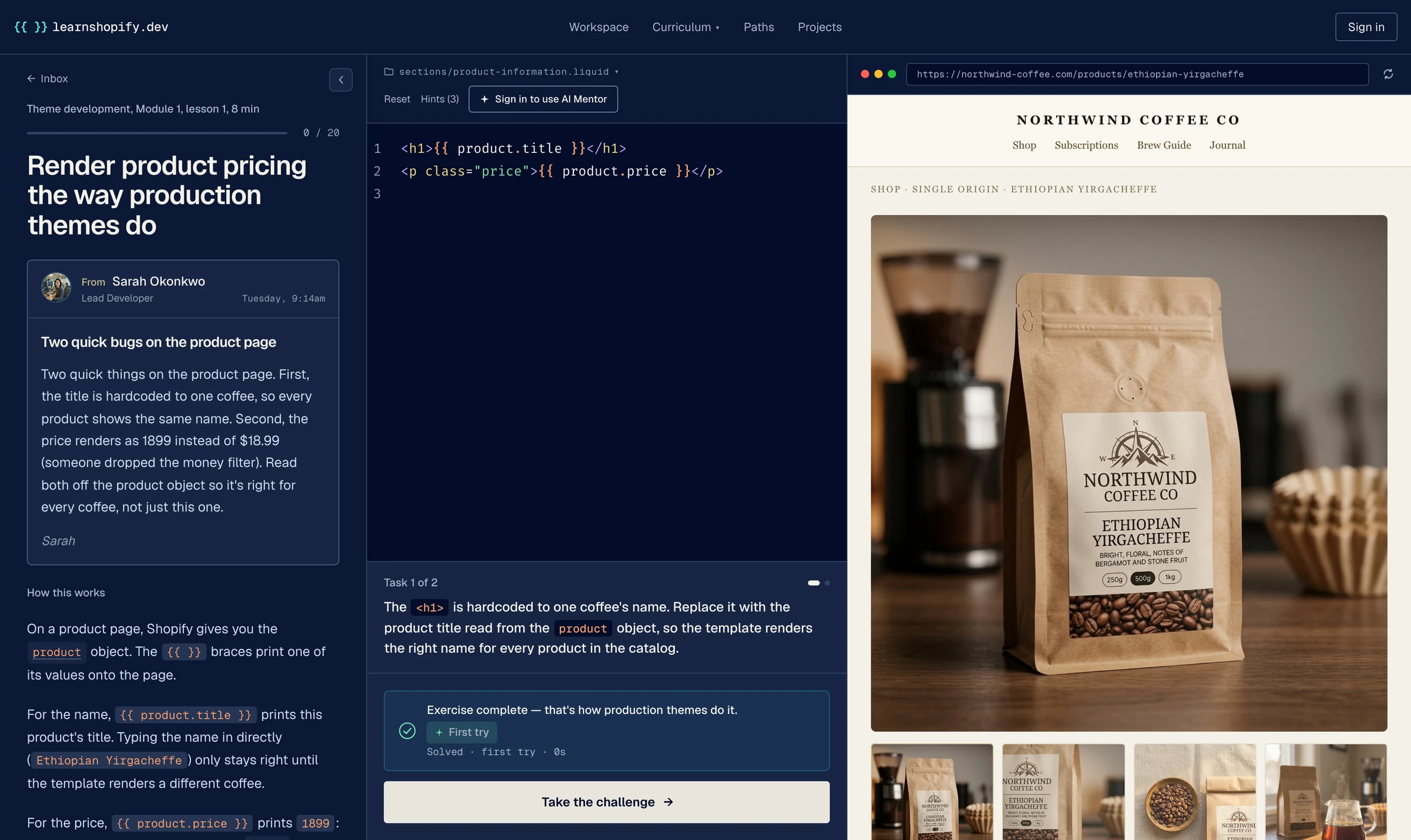
The lesson workspace: Sarah's email on the left, the Liquid editor in the middle with the task solved, and the Northwind storefront on the right showing the coffee's product page.
  1. Step 1: You get a task

    A short message from someone on the team: what's broken and what they need.

  2. Step 2: You write the code

    In a Liquid editor with real Shopify data. The same code you'd write for a client's store.

  3. Step 3: The store updates

    The store preview changes as you type, with real products, variants and prices.

  4. Step 4: Your code is checked

    Like a code review would: does it work, and is it written the right way? Pass, and the next task arrives.

Working with AI

AI can write the code.
You need to know when it's wrong.

Clients still pay a developer to check the AI's work. You can only check code you understand, so you learn both: write it yourself, then review what the AI wrote.

  1. 01

    Write it

    By hand first, so you know what correct code looks like.

  2. 02

    Check it

    Read the AI's version of the same task and find what it got wrong.

  3. 03

    Guide it

    Write prompts that get it right, and fix the result when they don't.

From Module 3: Marcus asked an AI for a featured products section. Would you ship it?

sections/featured-products.liquidWritten by AI
1<div class="featured">2  <h2>Featured Products</h2>13  <div class="grid">4    {% for product in collection.products limit: 4 %}5      <a href="/collections/all" class="card">26        <img src="{{ product.featured_image | image_url: width: 300 }}">37        <h3>{{ product.title }}</h3>8        <p class="price">${{ product.price }}</p>49      </a>10    {% endfor %}11  </div>12</div>
  1. Heading marketing can't edit

    The heading 'Featured Products' is hardcoded with an empty settings: []. Marketing can't edit it. It should be a text setting read via section.settings.

  2. Every card links to the same page

    Every card links to a hardcoded /collections/all instead of the product. It should be href="{{ product.url }}" (and real URLs come from the routes object, not hardcoded paths).

  3. Image without alt text

    The <img> has no alt. That's an accessibility miss Theme Check will flag: alt="{{ product.title }}".

  4. Prints raw cents

    The price prints ${{ product.price }}, which renders raw cents ($1899, not $18.99). It must go through the money filter: {{ product.price | money }}.

Most courses teach you the syntax. This one also teaches you to check the AI's work, which is what clients pay for.

Why it works

What makes it different
from a video course.

01

You learn to judge code

AI can write {{ product.title }}. It can't tell when the wrong filter is about to ship to a real store. You learn to spot that.

What AI misses

- {{ product.price }}

+ {{ product.price | money }}

02

Real tasks, not exercises

Every task comes from someone on the team with a deadline: Sarah in engineering, Marcus in marketing, Priya the founder.

From Marcus Brennan · an actual ticket

“The homepage hero needs to be more emotional.”

03

Shopify's current theme

You learn on Horizon, the theme Shopify ships today, with theme blocks and its section structure. The setup agencies work with now.

Where lesson 1 lives

sections/

› product-information.liquid

blocks/

snippets/

What you'll build

From your first line of Liquid
to a full store.

Each module adds the skills Shopify agencies and clients ask for, one small task at a time.

learnshopify.dev/learn/cart-drawer-component
Module 4: the slide-out cart drawer, built in the browser. Try it yourself

01

~ 1 week

Module 01: Your first days

Liquid syntax, the file structure, the object model basics. By Friday you know where every file lives in a Horizon theme.

  • Output, filters, tags, conditionals
  • money & date filters at production quality
  • Where every file lives in a Horizon theme
  • Reading real Horizon source confidently

02

~ 2 to 3 weeks

Module 02: Your first real PR

The Shopify object model: products, variants, collections, customers, cart. Ship your first non-trivial change.

  • product, variant, and collection objects
  • Cart logic and line item properties
  • customer.tags-driven personalization
  • Search, pagination, and sort

03

~ 2 to 3 weeks

Module 03: Architecture week

How Horizon themes are actually built. Layouts, templates, sections, blocks, snippets, settings, locales.

  • Sections, blocks, and content_for
  • Theme settings & locales
  • Custom section schemas
  • Snippet composition patterns

04

~ 2 to 3 weeks

Module 04: Big feature ship

Own a real project end-to-end. The new collection page redesign is yours from Figma to production.

  • Custom PDP and collection templates
  • Metafields and metaobjects
  • Forms, cart drawer, AJAX patterns
  • Currency & market localization

05

~ 2 to 3 weeks

Module 05: Senior dev territory

Subscriptions, wholesale app blocks, metafield-driven recommendations. The work gets ambitious; reviews get rarer.

  • Subscription app integration
  • App blocks for wholesale portals
  • Metafield-driven recommendations
  • Real-time cart with the Storefront API

06

~ 6 weeks

Module 06: Production responsibility

From new hire to lead developer. CLI workflow, performance, accessibility, SEO, deployment.

  • Shopify CLI + GitHub integration
  • Core Web Vitals & performance budgets
  • Accessibility to WCAG 2.2 AA
  • Capstone storefront ready to ship

At the end: a real Horizon store in your portfolio.

Free starter kit

Not ready yet? Get the free starter kit.

A short guide to getting started as a Shopify developer. One email, nothing else.

  • A roadmap to getting hired as a Shopify dev
  • A doc-validated Liquid cheat sheet
  • 8 Claude skills that write production Shopify code

One email with the kit. No drip sequence, no spam. Unsubscribe anytime.

Who you'll work with

Five coworkers.
Each one sends you tasks.

Each one wants something different, just like real clients and teams. Learning to handle that is part of the job.

Inbox · Northwind Coffee Co5 unread
  • Sarah Okonkwo · Lead Developer

    9:14am

    Re: that PR, can we talk about the assign vs. capture call?

    Your throughline. Patient mentor. Gives you the why behind every task and trusts you to read the docs after.

  • Marcus Brennan · Marketing Director

    10:02am

    URGENT: Hero feels flat, can we ✨ it up by EOD?

    Marketing director. Wants the homepage hero to be more emotional. Source of the requests that test your patience.

  • Priya Nair · Founder & CEO

    11:40am

    BFCM landing pages: three of them, ready by the 17th

    The founder. Concise, growth-focused. When Priya files a ticket, Black Friday is on the line.

  • Diego Restrepo · Operations

    1:15pm

    Inventory dashboard: need to see stock-by-vendor view

    Ops. No flourish. Talks SKUs, ship dates, and the edge cases everyone else forgot.

  • Yuki Ishida · Senior Designer

    3:28pm

    Figma → PDP: the buy buttons are off by 2px on tablet

    Senior designer. Will tell you the type weight should be 450, not 500. She is right.

Module by module

From small fixes
to whole features.

Each module is a step up. You start with small fixes and end up building whole features on your own.

  1. 01 · Module 1

    Your first days

    Sarah walks you through the codebase. You fix small things, render your first product price, and learn where everything lives.

    “I just fixed a typo. I'm a developer now?”

  2. 02 · Module 2

    Your first real PR

    Marcus wants inventory status on the product cards. Delivering it means actually understanding the object model. You ship your first real change.

    “Wait, I actually shipped a change. That was me.”

  3. 03 · Module 3

    Architecture week

    Priya needs three campaign landing pages. You learn how themes are really structured and build the scaffold marketing fills in.

    “Oh. Themes are made of these pieces. Now everything makes sense.”

  4. 04 · Module 4

    Big feature ship

    The collection page redesign is yours from Figma to production. Multi-week project that ties modules 1 through 3 together. Sarah reviews. You own.

    “This is hard. I'm building a real thing.”

  5. 05 · Module 5

    Senior dev territory

    Subscription app integration. Wholesale app blocks. A metafield-driven recommendation system. The work gets ambitious; Sarah is reviewing less and trusting more.

    “I'm doing stuff I didn't think I could do.”

  6. 06 · Then: the app path

    Build a real app

    Included in Pro. You build a real Shopify app with an AI coding agent, on your own development store, and end with it live on a second store. Your code and your store are checked at every step.

    “I can build the app, not just the theme around it.”

211 lessons · Free to start

Real tasks, broken into small steps
you can finish.

FAQ

The questions everyone asks.

Do I need to know Shopify already?

No. You need some HTML and a little JavaScript. Module 1 starts from zero with Shopify: where the files live and how Liquid works. By Module 2 you're building real product features.

Why not just learn from Shopify's docs?

Shopify's docs are great for looking things up. Here you practice: real tasks, your code checked right away, and the reasons behind each pattern. Use both.

Will AI tools make this obsolete?

No. The more code AI writes, the more clients need someone who can tell good code from bad. Every lesson shows what AI usually gets wrong on that task.

What do I actually build by the end?

A complete Shopify store on the Horizon theme (Northwind Coffee Co) that you can install on a real development store and show clients. With Pro you also build a Shopify app.

How is this different from Codecademy or YouTube playlists?

You don't watch, you build. Every lesson is a small task on a real store, and your code is checked right away. It's all about Shopify, from your first line of Liquid to a full store and an app.

Is it gamified? Are there points and badges?

No points or streaks. The fun is in the work: a task arrives, you solve it, the check turns green, and the next task shows up. Finish a module and you get a certificate.

What does it cost?

Module 1 is free, no card needed. Pro unlocks all 211 lessons for $29 a month or $290 a year. Founder lifetime is one payment of $390, until the end of 2026.

Bas Lefeber, founder of learnshopify.dev

From the founder

Hi, I'm Bas.

When I learned Shopify development, I noticed something weird. If you want to learn React, JavaScript, or Python, you've got Scrimba, Codecademy, freeCodeCamp, dozens of interactive, gamified platforms competing for your attention. Click through, build something small, see it work, repeat.

For Shopify, you get the Shopify docs (excellent, but plain) and a handful of good YouTubers. That's about it. No live editor in a browser, no tickets landing from a fake employer, no validator nudging you toward the patterns a senior dev would actually write.

I built learnshopify.dev because that gap shouldn't exist. The way frontend devs learn React by building small things and watching them work, Shopify devs should be able to learn by writing Liquid against a live storefront. That's the whole reason this exists.

Bas Lefeber, founder of learnshopify.dev

Pricing

Start free. Upgrade when you want more.

Module 1 is free, no card needed. Pro unlocks every lesson for $29 a month (or $24 a month paid yearly).

Or pay once: Founder lifetime is $390, available until the end of 2026.

Start free

Ready to start?

Fix your first bug on a real Shopify store in a few minutes. Module 1 is free, no card needed.

Start lesson 1

Free · No card · No signup

A pour-over brewing next to a bag of Northwind Ethiopian Yirgacheffe.

Tuesday, 9:14am

Your first task is waiting.

Open lesson 1, read the task, and fix two small bugs on a product page. It takes a few minutes.

Module 1 free · Pro $29 a month · No card to start