Conversion
How to build a Shopify cart drawer without an app (the Ajax way)
Build a slide-out Shopify cart drawer with the Ajax API and no app: add to cart with no page reload, re-read /cart.js so totals are always right, then slide the drawer open. Full, production-grade code.

Bas Lefeber
Founder, learnshopify.dev · June 19, 2026 · 6 min read
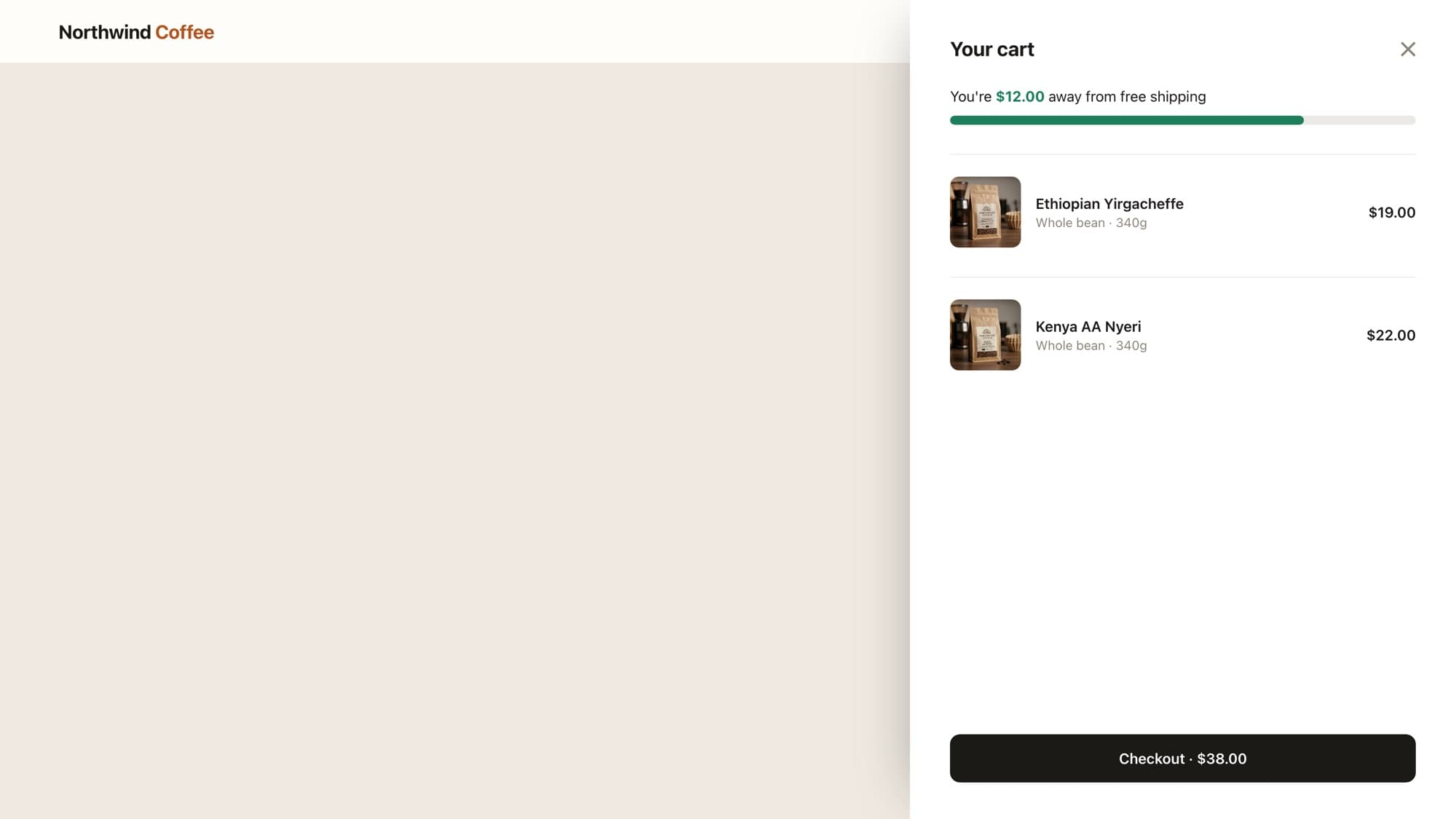
A cart drawer is the slide-out panel that appears when a shopper adds something to their cart, no full-page reload, no trip to /cart. They add a coffee, the drawer slides in showing what's in the bag and a Checkout button, and they keep shopping. Nearly every high-converting Shopify store has one, and you do not need an app to build it. You need two Ajax endpoints and about forty lines of JavaScript.
The catch is that most tutorials (and most AI tools) build it the fragile way: they track the cart count in a variable and update the DOM by hand. That drifts out of sync the moment a line item merges, a discount applies, or something sells out. This guide builds it the way a senior developer does, where the server is always the source of truth.
The two endpoints that do all the work
Shopify ships a JSON cart API on every storefront, no setup required. The whole drawer rests on two endpoints:
POST /cart/add.jsadds a variant to the cart. You send a variantidand aquantity, Shopify mutates the cart.GET /cart.jsreturns the entire current cart as JSON: every line, the item count, and the totals, all already calculated by Shopify.
The discipline that separates a drawer that works from one that quietly lies is this: after every change, you re-read /cart.js and render from that response. You never increment a counter yourself. Shopify already knows the truth, your only job is to display it.
Step 1: the drawer markup
Build the drawer as a section so it renders on every page, and render the cart server-side first with Liquid. That way the drawer is correct on initial load even before JavaScript runs, and your JS only has to update it after changes.
<button type="button" class="cart-toggle" data-cart-open> Cart <span data-cart-count>{{ cart.item_count }}</span></button> <aside class="cart-drawer" data-cart-drawer aria-hidden="true" aria-label="Shopping cart"> <header class="cart-drawer__head"> <h2>Your cart</h2> <button type="button" data-cart-close aria-label="Close cart">×</button> </header> <ul class="cart-drawer__items" data-cart-items> {% for item in cart.items %} <li class="cart-item"> {{ item.image | image_url: width: 128 | image_tag: alt: item.product.title, loading: 'lazy' }} <div> <p class="cart-item__title">{{ item.product.title }}</p> <p class="cart-item__variant">{{ item.variant.title }}</p> </div> <span class="cart-item__price">{{ item.final_line_price | money }}</span> </li> {% endfor %} </ul> {% form 'cart', class: 'cart-drawer__foot' %} <div class="cart-drawer__subtotal"> <span>Subtotal</span> <span data-cart-subtotal>{{ cart.total_price | money }}</span> </div> <button type="submit" name="checkout" class="cart-drawer__checkout">Checkout</button> {% endform %}</aside>Why server-render the cart first
If the shopper lands with items already in their cart, the drawer is correct before a single line of JS executes. This is progressive enhancement: the markup works on its own, and JavaScript makes it slide instead of reload. AI-generated drawers almost always skip this and render an empty drawer until JS fills it.
Step 2: add to cart without a reload
Your product cards need an add button that carries the variant id. The id comes from Liquid, so the right variant is added every time:
<button type="button" data-add-to-cart data-variant-id="{{ product.selected_or_first_available_variant.id }}"> Add to cart</button>Now wire it up. Use one delegated click listener on the document, not a listener per button. Delegation means it keeps working even when you re-render the grid (infinite scroll, filtering), and it never double-binds.
const drawer = document.querySelector('[data-cart-drawer]'); function openDrawer() { drawer.classList.add('is-open'); drawer.setAttribute('aria-hidden', 'false');} // Re-read the real cart and paint the drawer from it. The ONE function// that ever touches the cart UI, so there's only one source of truth.async function refreshCart() { const cart = await fetch('/cart.js').then((r) => r.json()); renderCart(cart);} // Delegated: survives re-renders, works on every card, never double-binds.document.addEventListener('click', async (event) => { const button = event.target.closest('[data-add-to-cart]'); if (!button) return; await fetch('/cart/add.js', { method: 'POST', headers: { 'Content-Type': 'application/json' }, body: JSON.stringify({ id: button.dataset.variantId, quantity: 1 }), }); await refreshCart(); // re-read the truth, then... openDrawer(); // ...slide it in so the shopper sees what happened});Step 3: render from the server's truth
Here is the function that paints the drawer from a /cart.js response. Notice it reads item_count and total_price straight off the cart Shopify returned, it never calculates them:
function renderCart(cart) { document.querySelector('[data-cart-count]').textContent = cart.item_count; document.querySelector('[data-cart-subtotal]').textContent = money(cart.total_price); document.querySelector('[data-cart-items]').innerHTML = cart.items .map((item) => ` <li class="cart-item"> <img src="${item.image}" alt="" width="64" height="64" loading="lazy"> <div> <p class="cart-item__title">${item.product_title}</p> <p class="cart-item__variant">${item.variant_title ?? ''}</p> </div> <span class="cart-item__price">${money(item.final_line_price)}</span> </li>`) .join('');} // The Ajax API returns money in CENTS. Forgetting this is the classic bug:// a $18.99 line shows as 1899. Divide by 100 on the way out.function money(cents) { return '$' + (cents / 100).toFixed(2);}Note
For a multi-currency store, swap the hand-rolled money() for Shopify's own formatter so currency, symbol placement, and decimals follow the active market. The principle is the same: read the number from the cart, format it on the way out.
Step 4: open, close, and feel native
The slide itself is CSS, a transform plus a transition, so it animates on the GPU and stays smooth. A backdrop (scrim) behind the drawer catches the click-to-close:
.cart-drawer { position: fixed; inset: 0 0 0 auto; width: min(420px, 100%); background: #fff; transform: translateX(100%); transition: transform 0.3s ease; display: flex; flex-direction: column;}.cart-drawer.is-open { transform: translateX(0); }Then wire the close affordances: the close button, the backdrop, and the Escape key. Set aria-hidden as the drawer opens and closes, and move focus into the drawer on open so keyboard and screen-reader users are not stranded behind it. These touches are exactly what separates a drawer that feels like part of the theme from one that feels bolted on, and they are the first things a homemade build skips.
What AI tools get wrong here
- Tracking the count locally (
count = count + 1) instead of re-reading/cart.js. It looks right until a line merges or a discount lands, then the bubble disagrees with checkout. - Binding a listener per button. Re-render the grid and the new buttons are dead. One delegated listener on the document never has this problem.
- Rendering cents as dollars. The Ajax API returns
1899, not18.99. Divide by 100, or you ship a $1,899 coffee. - Inventing /cart/remove.js. There is no such endpoint. To remove a line you POST to /cart/change.js with
quantity: 0.
Learn this properly · free lesson
Add to cart without a page reload: the cart drawer
Build this exact cart drawer yourself, in the browser, against a working mock Shopify store. You write the add-to-cart JS, click the button, and watch the real drawer slide open and the cart update. Free, no signup.
Try this lesson — freeWhere to take it next
Once the add-and-open loop works, the rest of the drawer is the same pattern applied again. A quantity stepper posts to /cart/change.js and calls refreshCart(). A free shipping progress bar derives its width from cart.total_price on every render. An upsell row pulls related products without an app from the recommendations API. And a sticky add to cart bar feeds the same drawer from a long product page. Every one of them re-reads the cart and renders from it, that single rule is the whole skill.
Frequently asked questions
How do I add a cart drawer in Shopify without an app?
Render a drawer section with Liquid, then use Shopify's Ajax cart API: POST /cart/add.js to add an item, GET /cart.js to re-read the cart, and render the drawer from that response before sliding it open with a CSS transform. It is about forty lines of JavaScript and no app.
What is the difference between /cart/add.js and /cart.js?
POST /cart/add.js changes the cart by adding a variant. GET /cart.js reads the whole current cart back as JSON. The reliable pattern is to call add.js to mutate, then immediately fetch /cart.js and render the drawer from it, so the UI always matches the real cart.
Why is my cart price showing a huge number like 1899?
The Shopify Ajax API returns money in cents. A $18.99 line item comes back as 1899. Divide by 100 when you display it, or use Shopify's money formatter for multi-currency stores.
How do I remove an item from the cart with the Ajax API?
There is no /cart/remove.js endpoint. To remove a line, POST to /cart/change.js with the line's id or key and quantity: 0, then re-read /cart.js and re-render the drawer.
Start free
Ready to become a Shopify developer?
You just read how it works. Now write it yourself: real tickets from a live store, in an editor where the storefront updates as you type. Module 1 is free, no card.
Free · No credit card · Your first win in minutes
About the author
Bas Lefeber, Founder, learnshopify.dev
Bas builds learnshopify.dev, where developers learn production-grade Shopify theme development against a live storefront. He writes about Liquid, theme architecture, and the parts of the job that still matter now that AI writes the code.
Keep going in the curriculum